As a business grows, managing daily operations becomes more difficult. A manufacturer may struggle to track raw materials and production schedules. A distributor may have trouble keeping inventory accurate across multiple warehouses. A retailer may use separate systems for online orders, in-store sales, and accounting.
When these systems do not share information, employees spend more time updating records and checking data.
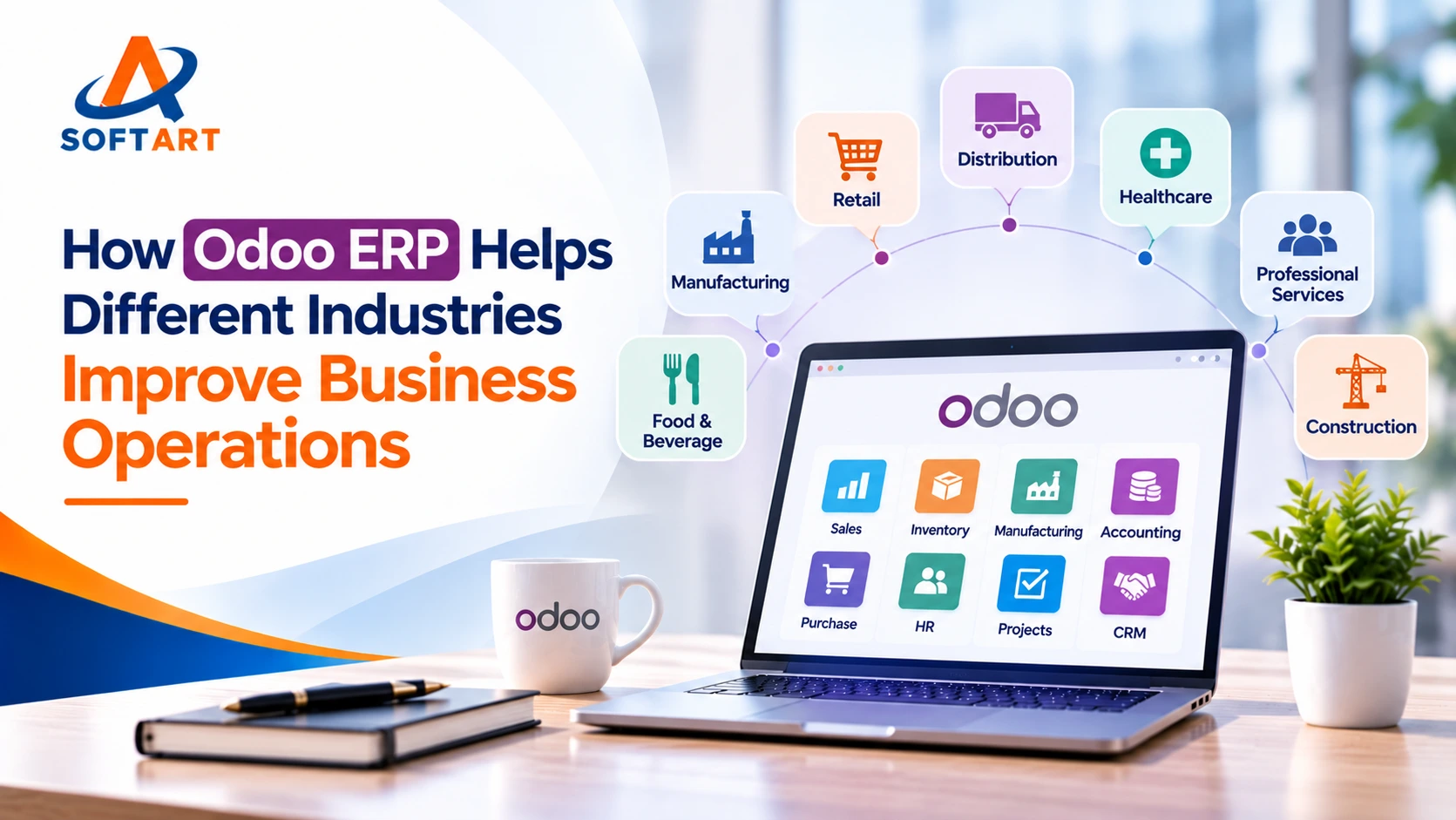
Odoo ERP helps businesses manage these activities through one connected platform. It offers applications for sales, CRM, accounting, inventory, manufacturing, purchasing, and other business needs. Companies can start with the applications they need and add more as their operations grow.
Let’s look at how Odoo ERP supports different industries and the business tasks it can help manage.
What Is Odoo ERP?
Odoo is a business management platform with a range of connected applications. Instead of using separate software for every department, a company can manage many of its daily tasks in one system.
For example, a customer enquiry can be recorded in CRM, converted into a sales order, linked to inventory or production, and followed by delivery and invoicing. This reduces the need to enter the same information in different places.
Odoo can be set up for different business types. The right applications depend on how a company sells products, manages stock, handles orders, and tracks its finances.
How Does Odoo ERP Help Different Industries?
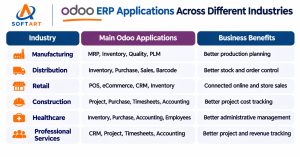
1. How Does Odoo Help Manufacturers Manage Production?
Manufacturing companies need to manage customer orders, raw materials, production schedules, quality checks, and finished goods. When these activities are handled separately, tracking production and meeting delivery dates can become difficult.
Odoo connects CRM, Sales, Purchase, Manufacturing, Inventory, Quality, Maintenance, and Accounting applications.
For example, when a customer confirms an order, the sales team can check product availability. If more products need to be made, the manufacturing team can review bills of materials (BOMs), plan manufacturing orders, and assign work to work centers. Inventory helps track raw materials and finished products, while Quality supports product checks during production.
This gives teams a clearer view of orders, materials, production progress, and costs.
2. How Does Odoo Help Distributors Manage Inventory and Orders?
Wholesale and distribution businesses handle customer enquiries, bulk orders, supplier purchases, warehouse stock, and deliveries. Managing these activities across separate systems can lead to stock errors and order delays.
Odoo CRM and Sales help manage customer enquiries and orders. Purchase supports supplier orders, while Inventory manages multiple warehouses, stock transfers, product locations, and replenishment rules. Accounting connects invoices and payments with business transactions.
For example, a distributor with warehouses in New Jersey and Texas can check stock at both locations, process customer orders, and arrange stock transfers when needed.
This helps sales, purchasing, warehouse, and finance teams work with the same business information.
3. How Does Odoo Help Retailers Manage Sales and Inventory?
Retail businesses may sell through physical stores, online shops, or both. Keeping product prices, stock levels, customer details, and orders updated across different channels can take time.
Odoo offers Point of Sale (POS), eCommerce, CRM, Sales, Inventory, Purchase, and Accounting applications.
A customer purchase through a store’s POS system can update the inventory record. Online orders can also be managed through the sales and delivery process. Retailers can track customer information, manage product availability, and review sales records.
This helps businesses manage store and online sales without maintaining completely separate records.
4. How Does Odoo Help Construction Companies Manage Operations?
Construction companies manage customer enquiries, project quotations, contracts, materials, suppliers, workers, and project expenses. Keeping track of these activities across different job sites can be challenging.
Odoo CRM and Sales can help manage enquiries and quotations. Project supports task planning and progress tracking, while Purchase helps manage supplier orders. Timesheets record employee working hours, and Accounting helps track invoices and project-related expenses.
Analytic accounting can also help businesses review costs against individual projects.
The setup should match the company’s project management, costing, and reporting needs. Specialist construction requirements may need additional applications or custom development.
5. How Does Odoo Help Healthcare Businesses Manage Operations?
Healthcare businesses need to manage medical supplies, purchasing, staff, expenses, customer billing, and financial records. Poor coordination between these activities can affect daily administration.
Odoo Inventory and Purchase can help manage medical supplies and supplier orders. Employees and Accounting support staff administration, expenses, invoicing, and financial records. CRM may also help manage customer enquiries where appropriate.
These applications can support the administrative side of healthcare operations. However, businesses that need patient records, clinical workflows, or specialist healthcare systems must assess the required software and integrations separately.
6. How Does Odoo Help Service Businesses Manage Clients and Projects?
Consulting firms, IT service providers, and other professional service companies need to manage leads, client relationships, proposals, projects, employee time, and invoices.
Odoo CRM helps track leads and customer communication. Sales manages quotations, while Project and Timesheets help teams plan work, assign tasks, and record time spent on client projects. Accounting connects billable work with customer invoices and payments.
Managers can review project progress, employee time, customer billing, and business finances from connected applications.
How Does Odoo Connect Different Business Departments?
One of the main reasons businesses choose ERP software is to connect work across departments.
Consider a company that receives a customer enquiry. The sales team records it in CRM, prepares a quotation, and confirms the order. The inventory or manufacturing team then handles the product requirement. The warehouse arranges delivery, and the finance team creates an invoice and records the payment in Accounting.
When these steps are connected in Odoo, teams can work with shared business information instead of maintaining separate records for every department.
The exact workflow depends on the applications selected and how the system is configured.

What Should US Businesses Consider Before Implementing Odoo ERP?
Choosing ERP software is only one part of the decision. Businesses also need to plan how the system will work with their current processes.
Before starting an Odoo implementation, consider:
- Business requirements: Identify which departments need Odoo and what tasks the system should manage.
- Odoo data migration: Review customer records, supplier details, products, inventory, and financial data before moving them into the new system.
- Integrations: Check whether Odoo needs to connect with existing eCommerce platforms, shipping services, payment tools, or other software.
- Customization: Identify which needs can be handled with standard Odoo applications and which require custom development.
- Odoo cloud hosting: Choose a hosting option based on your business size, security needs, technical requirements, and support plan.
- Training and support: Make sure employees understand the new system and know where to get help after launch.
If your company is moving from an older ERP or accounting system, choosing a provider of Odoo migration services USA can help you plan the move, review existing data, and test the new system before going live.
Planning a Move from NetSuite to Odoo?
Businesses currently using NetSuite may consider Odoo when reviewing their ERP costs, business requirements, or software needs. However, switching ERP systems requires careful planning.
Customer records, product information, inventory, financial data, and existing workflows need to be reviewed before migration.
SoftArt Solutions helps businesses plan their ERP transition. Learn more about our NetSuite to Odoo Migration Services to understand how to plan your move.
Working with an experienced Odoo ERP implementation partner can also help you review your requirements, plan integrations, and prepare for the new system.
Is Your Business Ready to Move to Odoo ERP?
Every business has different processes, software needs, and plans for growth. Before choosing an ERP system, it is worth reviewing how your teams work and what needs to change.
SoftArt Solutions helps businesses with Odoo consulting, implementation, Odoo CRM, data migration, integrations, and Odoo cloud hosting.
Book a 60-Minute Free Odoo Business Fit Session with Your Own Data. Discuss your current processes, business needs, and whether Odoo is the right choice for your company.
Frequently Asked Questions About Odoo ERP
1. Which Industries Can Use Odoo ERP?
Odoo ERP can support manufacturing, wholesale distribution, retail, eCommerce, construction, healthcare administration, professional services, education, and nonprofit organizations. The required applications depend on each business.
2. Can Odoo Manage All Business Operations?
Odoo can connect sales, CRM, purchasing, inventory, manufacturing, accounting, and other business activities. However, the applications, integrations, and custom development needed depend on the company’s requirements.
3. Can Odoo Manage Multiple Warehouses?
Yes. Odoo Inventory supports multiple warehouses, stock locations, internal transfers, and replenishment rules. Businesses can use these features to track stock across different facilities.
4. Is Odoo Suitable for Growing US Businesses?
Odoo can suit growing US businesses that want to connect sales, inventory, purchasing, manufacturing, and accounting. The right fit depends on business needs, integrations, implementation scope, and budget.
5. Can Odoo ERP Be Customized?
Yes. Odoo can be configured and extended to support different business processes. Standard applications should be reviewed first, followed by custom development where needed.
6. What Is Included in Odoo Data Migration?
Odoo data migration can include customer records, suppliers, products, inventory, open orders, and financial records from an existing system. The exact data depends on the old software and the requirements of the new Odoo setup.
7. Why Do Businesses Need Odoo Cloud Hosting?
Odoo cloud hosting provides an environment for running the ERP system. Businesses should compare hosting options based on performance, security, backups, customization needs, maintenance, and technical support.
8. How Can I Find Odoo Migration Services in the USA?
Look for an Odoo service provider that can review your current software, prepare a migration plan, check data accuracy, manage integrations, and support testing before launch. Ask about post-migration support as well.