ERP pricing often looks simpler than it really is. Many buyers compare only the software quote, then get surprised later by implementation, data migration, training, integrations, and support costs. That is where budgets start slipping.
Here is the direct answer. How to Accurately Calculate Total ERP Costs means looking at total cost of ownership, not just license price. That includes software, implementation, support, infrastructure, training, and indirect costs such as downtime and change management. ERP vendors also price differently based on business size, deployment model, user count, modules, and implementation complexity.
At SoftArt, we help businesses turn ERP pricing into a realistic budget using a structured ERP implementation cost calculator approach and platform-specific planning, including a netsuite price calculator view where needed.
What Should Be Included When You Calculate Total ERP Costs?
To calculate ERP cost properly, you need both direct and indirect costs over the life of the system, not only the vendor quote. NetSuite’s current pricing guidance says total cost of ownership includes initial licensing, deployment, ongoing operations, training, and business interruption or transition-related costs.
The main cost buckets usually look like this:
| Cost Area | What It Usually Includes |
|---|---|
| Software | Subscription or license fees, base platform, add-on modules |
| Implementation | Consulting, configuration, project management, testing |
| Data Work | Migration, cleansing, validation, mapping |
| Integration | CRM, ecommerce, payroll, warehouse, BI, APIs |
| Training | User onboarding, role-based training, documentation |
| Support | Ongoing help, optimisation, maintenance |
| Infrastructure | Hosting, environments, security tools, if applicable |
| Indirect Costs | Downtime, change management, internal team time |
That is the core starting point for How to Accurately Calculate Total ERP Costs.
Why Is The Software Quote Alone Not Enough?
The software quote is only one part of ERP spend. NetSuite’s pricing and implementation guidance says businesses often need to look beyond licensing to implementation, infrastructure, support, maintenance, training, and indirect costs such as downtime and change management.
In simple terms, software tells you what the ERP costs to buy. Total cost tells you what it costs to make it work well and keep it running.
That is why businesses that only compare vendor quotes often underestimate the real budget.
How Do You Build A Practical ERP Cost Formula?
A usable ERP cost formula should combine one-time costs and recurring costs.
A simple model is:
Total ERP Cost = Software + Implementation + Data Migration + Integrations + Training + Support + Infrastructure + Indirect Costs
You can also break it into:
- Year 1 cost for selection, setup, go-live, and training
- Annual recurring cost for subscriptions, support, and ongoing optimisation
- 3-year or 5-year TCO for real comparison across vendors
NetSuite’s current ERP pricing guidance specifically recommends evaluating total cost of ownership over time instead of focusing only on the initial spend.
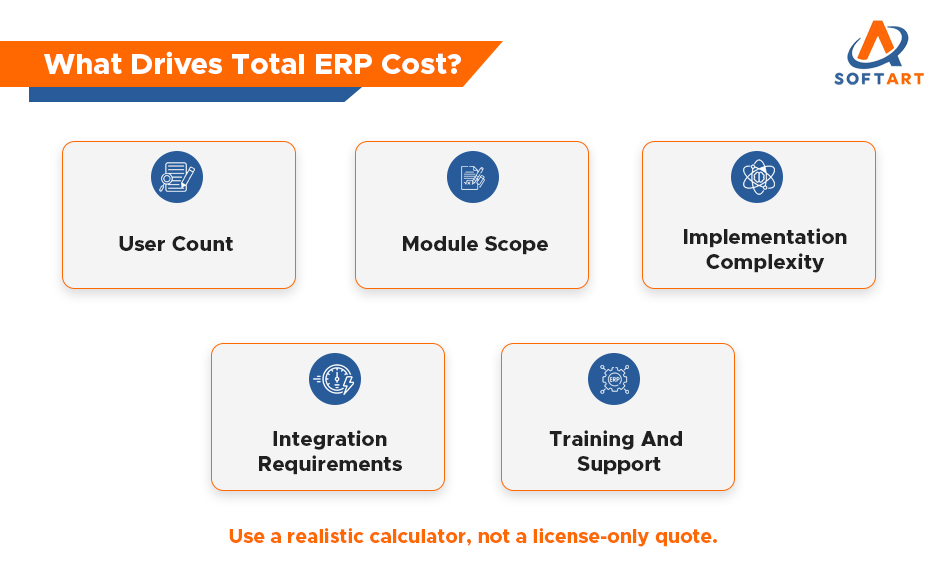
What Inputs Should An ERP Implementation Cost Calculator Use?
A good ERP implementation cost calculator should not ask only for company size. SoftArt’s calculator is built to capture platform, company details, user count, business requirements, implementation fees, training, support, and customisation or integration needs.
The most useful inputs are:
- number of users
- business size and legal entities
- modules required
- deployment model
- integrations needed
- customisation level
- data migration complexity
- training scope
- post-go-live support requirement
If a calculator ignores these inputs, the estimate will usually be too shallow to trust.
How Does A NetSuite Price Calculator Help?
A NetSuite price calculator helps translate NetSuite pricing from a general quote into a more realistic estimate. NetSuite modules can be added based on business need, and NetSuite’s own module guide notes that the platform is designed to expand functionality as requirements evolve.
That matters because NetSuite cost is usually shaped by:
- base subscription
- user count and role mix
- modules added
- implementation scope
- integrations
- training and support
SoftArt’s calculator specifically supports Oracle NetSuite and includes licensing, consulting, training, maintenance, and support projections.
Which Factors Usually Increase ERP Costs The Most?
The biggest cost drivers are usually complexity, not just vendor name. NetSuite’s current ERP pricing and implementation guidance says pricing varies widely based on deployment type, number of users, customisation, available resources, and implementation scope.
The factors that most often raise ERP budgets are:
- multi-entity or multi-country setup
- complex integrations
- heavy customisation
- poor data quality before migration
- large user groups
- long phased rollouts
- weak training and rework after go-live
This is why two companies buying the same ERP can end up with very different total costs.
What Is The Best Way To Compare ERP Options Fairly?
The best way to compare ERP options is to use the same cost structure for every vendor. Do not compare one vendor’s subscription fee with another vendor’s full project budget.
Use the same checklist for each option:
- software cost
- implementation services
- migration work
- integrations
- training
- support
- internal team effort
- 3-year or 5-year TCO
NetSuite’s readiness guidance says ERP selection should include TCO, ROI, integration, support, training, implementation phases, roadmap, and customisation needs.
When Should You Use A Calculator And When Should You Ask For A Tailored Estimate?
Use a calculator early. Use a tailored estimate before final approval.
A calculator is best for:
- early budgeting
- vendor comparison
- shortlisting options
- internal planning
A tailored estimate is best for:
- final approvals
- complex integrations
- multi-entity projects
- detailed rollout planning
- board-level budgeting
SoftArt positions its ERP cost calculator as an early budgeting and comparison tool, then supports detailed planning through expert consultation.
What Mistakes Cause ERP Budgeting Errors?
The most common mistake is treating ERP price like software price only. NetSuite’s pricing content warns that indirect and ongoing costs are often overlooked and can significantly raise total spend.
Other common mistakes include:
- ignoring training costs
- underestimating migration effort
- missing integration scope
- skipping support planning
- not pricing internal team time
- comparing quotes with different assumptions
These mistakes are exactly why businesses need a practical method for How to Accurately Calculate Total ERP Costs.
Get Expert Help From SoftArt To Calculate ERP Costs Properly
The right ERP budget should answer the reader’s real question: not “What is the quote?” but “What will this actually cost us to implement, run, and support?” That is the real meaning of How to Accurately Calculate Total ERP Costs.
SoftArt helps businesses build realistic ERP budgets using a structured ERP implementation cost calculator process and platform-specific planning, including netsuite price calculator support where relevant. Our team helps you compare options, surface hidden costs, and turn vendor pricing into a decision-ready budget. Get 20 hours of NetSuite Consulting on us today.
Contact SoftArt
Email: info@softart.co
US: +1 609-303-3003 | Canada: +1 609-303-3003 | UAE: +971 521490790
FAQs
How Do You Accurately Calculate Total ERP Costs?
You calculate total ERP costs by combining software, implementation, migration, integrations, training, support, infrastructure, and indirect costs over a multi-year period. Looking at TCO is more accurate than using license price alone.
What Should An ERP Implementation Cost Calculator Include?
It should include users, modules, deployment type, integration scope, customisation, migration effort, training, and support. SoftArt’s calculator also includes licensing, consulting, onboarding, and maintenance projections.
Is A NetSuite Price Calculator Better Than A Generic ERP Estimate?
For NetSuite planning, yes. A netsuite price calculator gives a more relevant estimate because it reflects NetSuite-specific modules, user needs, and implementation scope.
Why Do ERP Budgets Usually Go Over Plan?
Budgets often slip because businesses underestimate data migration, integrations, customisation, training, and internal effort. NetSuite’s pricing guidance says indirect and ongoing costs are commonly overlooked.
Should I Compare ERP Vendors Using Year 1 Cost Or TCO?
Use both, but make the final decision using TCO. Initial cost helps with budgeting, while TCO shows the real long-term financial impact.