![Duplicate Data in Dynamics 365 [What It Costs and How to Fix It]!](https://softartsolutionsinc.com/wp-content/uploads/2025/12/duplicate-data-in-dynamics-365-what-it-costs-and-how-to-fix-it.jpg)
Mid and large-scale organizations rely on Dynamics 365 to manage finance, operations, sales and supply chain. But even the most advanced ERP systems can fall victim to a silent productivity killer: duplicate data. At SoftArt, we have seen how these hidden inconsistencies quietly disrupt day-to-day operations across industries and become a major drain on productivity.
If your teams constantly fix mismatched customer records, reconcile vendor lists or manually clean product catalogs, you are already paying the price for a problem you didn’t create. Duplicate data slows down decision-making, weakens reporting, inflates operating costs and even affects customer experience.
This guide breaks down what duplicate data truly costs, why it happens in Dynamics 365 and how to fix duplicate data in Dynamics 365 using a structured, repeatable approach. You’ll also learn when to involve a Dynamics 365 Business Central consultant and how to prevent duplicates permanently.
Understanding Why Duplicate Data Exists in Dynamics 365
Duplicate data appears when two or more records represent the same entity such as a customer, vendor item/SKU, lead, contact or employee. Even small variations (e.g., ABC Pvt Ltd vs. A.B.C. Pvt Ltd) can create separate records.
Here are the most common reasons it happens:
- Manual data entry across Finance, CRM, HR and Supply Chain modules.
- Integrations that sync inconsistent data formats.
- Legacy ERP migrations that bring overlapping entries.
- Users having unrestricted record-creation permissions.
- Lack of naming conventions or data governance.
In short: duplicates persist due to inconsistent inputs, disconnected systems and limited data controls.
What Duplicate Data Costs Your Dynamics 365 Environment?
Duplicate data impacts financial accuracy, team productivity, customer experience and compliance. Here’s a quick breakdown of what it costs your business:
1. Higher Operational Costs
Teams waste hours reconciling records, validating customer information, fixing mismatches and resolving inventory errors.
Gartner reports that poor data quality costs large enterprises 12–15% of annual revenue.
2. Inaccurate Reporting and Analytics
Faulty dashboards lead to faulty decisions and poor forecasting.
3. Broken Customer Experience
- Multiple customer profiles often result in:
- Wrong invoices.
- Missed follow-ups.
- Inconsistent pricing.
- Duplicate outreach.
4. Compliance Risks
- Duplicate employee or vendor data may cause:
- Wrong tax filings.
- Duplicate payouts.
- Audit inconsistencies.
5. Slower Workflows
Processes such as quote-to-cash and procure-to-pay become unreliable when foundational data is inconsistent.
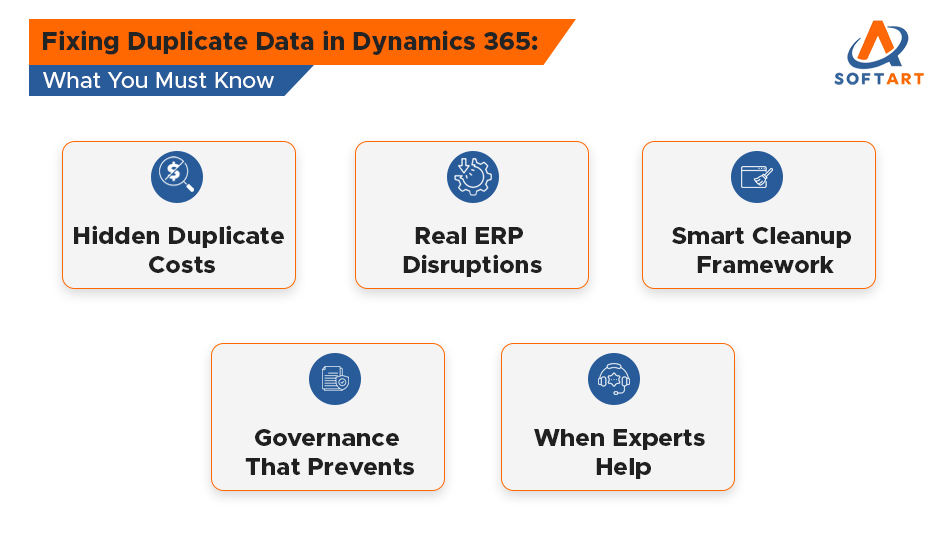
What Duplicate Data Looks Like in Real Dynamics 365 Scenarios?
To understand the real impact, here are common scenarios where duplicates disrupt ERP processes:
Scenario 1: Sales & CRM
Duplicate leads inflate the pipeline, triggering unnecessary outreach and customer frustration.
Scenario 2: Finance & Operations
Duplicate vendors cause payment discrepancies and audit risks.
Scenario 3: Warehouse & Inventory
Legacy imports often introduce repeated SKUs resulting in stockouts, overstocking and costing errors.
How to Fix Duplicate Data in Dynamics 365: A Complete Framework!
Cleaning duplicates requires a structured and repeatable approach for how to fix duplicate data in dynamics 365. These steps help create long-term data accuracy:
Step 1: Assess the Duplication Level
Start by analyzing how widespread the issue is. Check for:
- Duplicate customer/vendor entries.
- Items with similar descriptions.
- Leads with repeated emails or phone numbers.
- Contacts linked to multiple accounts.
Useful tools include Duplicate Detection Rules, Power Automate, Power BI Profiling, SQL Queries and Azure Data Factory.
Step 2: Define Data Governance Rules
Strong governance prevents duplicates from reappearing. Establish:
- Standard naming conventions.
- Required fields (GST, email, vendor/customer ID).
- Unique identifiers.
- Approval workflows.
- Validation rules.
Without governance, cleanup is temporary.
Step 3: Configure Duplicate Detection Rules
Set rules that identify duplicates based on:
- Email.
- Phone number.
- GST/VAT.
- Item description.
- Name similarity.
Apply rules across customers, vendors, leads, opportunities and products.
Step 4: Implement Data Deduplication Jobs
Choose the appropriate method based on your environment:
- Semi-automated: Manual merge triggered by alerts.
- Fully automated: Bulk cleanup with predefined logic.
- Third-party tools: KingswaySoft, Dataverse, Scribe.
Safety checklist:
- Back up data.
- Test in a sandbox.
- Validate merged records.
- Communicate changes.
Step 5: Standardize Data Formats
Standardization ensures consistency across all modules. Include:
- Unified naming patterns.
- Address normalization.
- Category and coding structure.
- Item master classification.
- Vendor name standardization.
Step 6: Strengthen Integrations
Data issues often arise from integrations. Improve accuracy by:
- Defining a master source of truth.
- Avoiding multi-directional sync loops.
- Cleaning data before integration.
- Validating incoming data.
- Using transformation logic in middleware.
Step 7: Train Users
User awareness is critical to preventing duplicates. Train staff on:
- Searching before creating records.
- Using merge functionality.
- Following naming rules.
- Validating customer/vendor identity.
Common Mistakes to Avoid Duplicate Data in Dynamics 365
Many cleanup efforts fail because they repeat these errors:
- Cleaning data directly in the live environment.
- Ignoring integration points.
- Allowing unrestricted record-creation permissions.
- Skipping validation after merging.
- Cleaning only CRM instead of all modules.
Actionable Takeaways:
Use this checklist to drive immediate and long-term improvements:
Immediate Steps
- Enable duplicate detection rules.
- Clean high-risk modules first.
- Create naming standards.
- Document all data sources.
Governance Actions
- Assign a data steward.
- Implement approval workflows.
- Monitor weekly using dashboards.
Long-Term Strategies
- Automate dedupe jobs.
- Modernize integrations.
- Maintain a single system of truth.
Cost, Time & ROI
Estimate your cleanup cost and timeline based on organization size:
| Organization Size | Cleanup Cost | Time Required |
|---|---|---|
| Mid-size | $8,000–$25,000 | 3–6 weeks |
| Enterprise | $30,000–$120,000 | 8–16 weeks |
| Complex Integrations | $100,000–$300,000 | 3–6 months |
ROI Benefits:
- 25-70% faster reporting.
- 15-50% higher user productivity.
- 20-30% better forecasting accuracy.
When to Involve a Dynamics 365 Business Central Consultant?
Bring in an expert when:
- Duplicate records exceed 1,000+.
- Multiple external systems are integrated.
- Migration created inconsistent data.
- Teams follow different naming conventions.
- Governance is missing.
- Reports or invoices repeatedly mismatch.
Case Study: 78% Duplicate Reduction in 10 Weeks
A manufacturing company migrating from SAP to D365 had 22,000+ duplicate vendor and item records. The solution included:
- Automated dedupe rules.
- Vendor name normalization.
- Item master cleanup.
- Standard naming conventions.
- Power Automate validation.
Outcome: 78% duplicate reduction and 34% improvement in inventory accuracy.
Partner with Dynamics 365 Experts to Eliminate Duplicates and Improve ERP Performance!
Duplicate data is more than a technical inconvenience that impacts reporting, customer experience and operational efficiency. Fixing it early ensures Dynamics 365 delivers accurate insights, streamlined workflows and stronger ROI.
If your organization is dealing with inconsistent customer, vendor or item records then partnering with certified Dynamics 365 experts can help restore data quality quickly and reliably. SoftArt Solutions Inc. provides structured data remediation, deduplication and long-term governance support tailored to your system.
For free assistance or guidance, connect with the team at connect@softart.co.
Frequently Asked Questions:
Q. What does duplicate data mean in Dynamics 365?
Ans. Duplicate data is basically a situation where you have two or more records of the same customer, vendor, item, or employee within Dynamics 365. It is commonly caused by entry errors of data that have been done manually, migrating data from the old system or the process of merging that comes from different software.
Q. Why is duplicate data a big problem for businesses using Dynamics 365?
Ans. Duplicate data makes the data processing slower, the employees get confused, mistakes related to invoices or payments increase and it also impacts the company’s reports. Besides, it results in the incorrect communication of customers and causes higher operational costs due to the fact that employees have to fix the errors that take their time instead of doing productive work.
Q. How do I know if my Dynamics 365 system has duplicate records?
Ans. You may find repeated customer names, multiple vendor entries, products with similar descriptions, invoices that do not match and errors in reports. If your team is always “double-checking” information it means that there are probably duplicates in your system.
Q. Can Dynamics 365 automatically detect and fix duplicate data?
Ans. Indeed, there are several tools that are available within Dynamics 365 like Duplicate Detection Rules, merge options and validation features which can be used to locate and solve duplicate records. However, for deep cleanup, large data volumes or issues that extend to the entire system, the solution of taking professional help and using advanced tools becomes inevitable.
Q. When should a company get professional help to remove duplicate data in Dynamics 365?
Ans. The question of when to get professional help can be answered in several scenarios such as thousands of duplicates, multiple systems connected to Dynamics 365, reports or invoices frequently showing incorrect data, or your team is excessively correcting mistakes. A certified Dynamics 365 consultant has the ability to resolve this issue promptly and facilitate long-term prevention.