If your business runs projects, client work, time-based billing, or resource-heavy delivery, project control usually breaks down in the same places. Teams lose track of budgets, time entries, resource allocation, and billing status because the work sits across spreadsheets, emails, and disconnected tools. That is when people start looking closely at NetSuite project management modules and how they fit into the wider ERP setup.
The direct answer is simple. NetSuite project management features help businesses manage projects, tasks, resources, time, expenses, billing, and reporting inside one connected system. When set up properly, NetSuite gives project teams and finance teams the same view of progress and profitability, which is why many companies also evaluate netsuite support services and compare top netsuite implementation partners before rollout.
This guide explains what NetSuite project management includes, which modules matter most, what features deliver real operational value, and when to involve SoftArt for implementation and long-term support.
What Is NetSuite Project Management And What Does It Actually Cover?
NetSuite project management covers the operational and financial side of project delivery inside the ERP. It supports project tracking, project tasks, resource assignments, time and expense capture, project billing, budgeting, and reporting, so teams can manage delivery and financial control in one place.
For businesses reviewing NetSuite project management modules, the important point is that this is not just a task list inside ERP. It connects project execution to revenue, costs, utilisation, and reporting. That is why companies comparing NetSuite project management features usually look beyond task tracking and focus on visibility, billing accuracy, and project profitability.
Which NetSuite Project Management Modules Matter Most?
The main project-related setup in NetSuite includes core project records plus supporting capabilities for tasks, resources, time, billing, and budgeting. Oracle’s documentation shows that advanced project tracking uses both the Projects feature and the Project Management feature, with related functions like Project Tasks, Resource Allocations, Time and Expenses, Project Billing, Job Costing and Project Budgeting, Reports, and Project Risk Forecast.
| Module / Capability | What It Helps You Manage |
|---|---|
| Projects And Project Management | Central project record, milestones, structure |
| Project Tasks | Task-level planning and progress tracking |
| Resource Allocations | Team assignment and workload planning |
| Time And Expenses | Time capture, expense entry, project costing |
| Project Billing | Billing tied to project work and progress |
| Job Costing And Budgeting | Budget vs actual control and margin visibility |
| Project Reports And Dashboard | Status, trends, and project-level reporting |
This is where NetSuite project management modules become useful for growing services, consulting, IT, and project-based businesses. If the setup is weak, even strong NetSuite project management features will not produce reliable reporting later.
Which NetSuite Project Management Features Deliver The Most Value Day To Day?
The most useful features are the ones that reduce delay between project activity and management visibility. Oracle states that NetSuite Project Management gives project managers and team members current project status, while the project dashboard provides quick access to project tasks, resources, Gantt views, and time and expense entry.
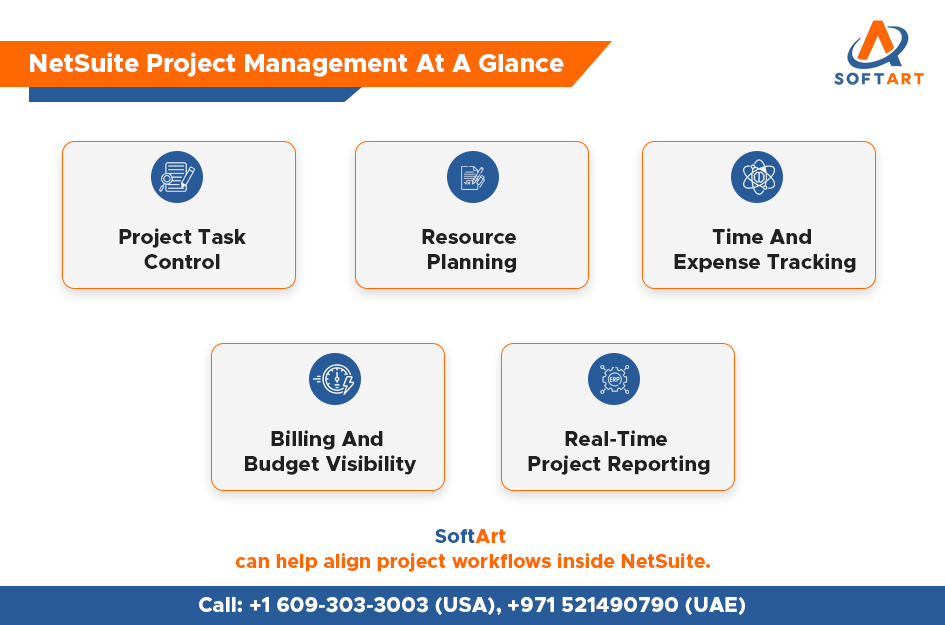
In daily operations, the most valuable NetSuite project management features usually include:
- Real-time project status visibility
- Project task and milestone tracking
- Resource assignment and allocation control
- Time and expense entry inside the same system
- Project billing linked to delivery progress
- Budget versus actual monitoring
- Reporting for utilisation, margin, and project health
For businesses trying to shortlist NetSuite project management modules, these features matter because they connect delivery teams with finance outcomes. A project may look busy on the operations side, but only proper billing, costing, and reporting show whether it is actually profitable.
How Does NetSuite Help With Resource Planning, Time Tracking, And Billing?
NetSuite helps by keeping project resourcing, time capture, expense tracking, and billing logic inside one environment. Oracle’s project management documentation includes working with resources, resource allocations, time and expenses for project resources, and project billing as connected parts of the solution.
This is one of the biggest reasons businesses invest in NetSuite project management features instead of using separate apps for time sheets, project tracking, and finance. When time and expense data flows directly into billing and reporting, project managers get cleaner control, while finance teams reduce manual reconciliation. That also makes netsuite support services more important after go-live, because reporting, billing rules, and user behaviour need ongoing tuning to stay accurate.
Which Businesses Usually Benefit Most From NetSuite Project Management Modules?
NetSuite project management is strongest for service-led and project-based businesses that need both operational control and financial clarity. NetSuite’s own project management and SuiteProjects material highlights use cases around planning, staffing, project management, billing, and reporting for services businesses.
The best-fit businesses usually include:
- IT services and system integration firms
- Consulting and professional services companies
- Agencies and creative delivery teams
- Engineering and field project businesses
- Multi-project organisations needing utilisation and margin reporting
If your business bills by milestone, tracks time by project, or struggles to connect delivery activity with invoices, NetSuite project management modules are worth serious evaluation. This is also where businesses often start comparing top netsuite implementation partners, because the quality of the setup directly affects budgeting, billing, and reporting confidence.
What Should You Check Before Turning On NetSuite Project Management Features?
You should confirm four things before rollout.
- First, your project structure must match how your teams actually deliver work.
- Second, billing rules should be clear before configuration starts.
- Third, time and expense discipline must be realistic for users.
- Fourth, reporting should be designed around management decisions, not only around technical setup.
Oracle also notes that advanced project records require enabling the Projects and Project Management features, and in some cases Advanced Billing.
This matters because even strong NetSuite project management features can disappoint when the project model is vague. Businesses often blame the software when the real issue is weak process design, poor billing logic, or inconsistent data entry. That is one reason top netsuite implementation partners spend time upfront on process mapping and rollout planning instead of only technical activation.
Why Do Netsuite Support Services Matter After Go-Live?
Go-live is not the finish line for project management inside ERP. Once teams start entering time, updating tasks, billing projects, and reviewing reports, real process gaps become visible. SoftArt’s support page states that its work truly begins once the system is running, with continuous optimization, support, and maintenance designed to keep the ERP operating effectively.
That is why netsuite support services matter long after implementation. They help refine dashboards, adjust workflows, improve reporting accuracy, and fix issues that only show up during day-to-day usage. For project-based businesses, this ongoing layer is just as important as selecting the right NetSuite project management modules in the first place.
How Do Top Netsuite Implementation Partners Improve Project Management Outcomes?
The best implementation partners do not just switch on features. They align project workflows, billing, data migration, integrations, and reporting so the system reflects how the business actually runs.
SoftArt offers NetSuite implementation services around tailored deployment, integrated data, and enterprise-wide visibility, and our integration services focus on unified data and streamlined operations.
This is why businesses evaluating top netsuite implementation partners should look at more than technical certification. The better question is whether the partner can design reliable project workflows, connect surrounding systems, and support adoption after go-live.
SoftArt owns 20 years of ERP experience, consulting, migrations, implementations, and 24×7 support, which matters when project management touches operations, finance, and reporting together.
Get Expert Help From SoftArt For NetSuite Project Management
Choosing the right NetSuite Project Management Features is only part of the decision. The bigger challenge is setting them up in a way that makes billing, reporting, resource planning, and project visibility work together from day one. That is where implementation quality matters.
SoftArt supports businesses with NetSuite consulting, implementation, integrations, migrations, and ongoing support. We own 20 years of ERP experience, 24×7 support, and NetSuite-focused implementation and integration services. We also share professional services case study where a tailored NetSuite setup improved billing accuracy by 45% and gave the client real-time visibility into project financial performance.
If you are reviewing netsuite support services, planning a new rollout, or comparing top netsuite implementation partners for a project-led business, SoftArt can help you map the right setup with clarity.
Call SoftArt: +1 609-303-3003 (USA), +971 521490790 (UAE)
Email: connect@softart.co
FAQs
What Are NetSuite Project Management Modules?
They are the project-related capabilities inside NetSuite that support projects, tasks, resources, time entry, billing, budgeting, and reporting. Oracle documents these areas under Project Management, including project tasks, allocations, time and expenses, billing, and project reports.
What Are The Most Useful NetSuite Project Management Features?
The most useful features usually include task tracking, resource allocations, time and expense entry, project billing, project dashboards, and budget versus actual reporting. Oracle also highlights quick access to Gantt charts, resource management, and project-specific dashboards.
Do I Need Netsuite Support Services After Implementation?
Yes, in most cases. Support is often needed to refine workflows, improve reports, resolve user issues, and keep the project setup aligned with real business use after go-live. SoftArt positions support and optimization as an ongoing requirement, not a one-time task.
How Do I Choose Among Top Netsuite Implementation Partners?
Look for a partner that can handle implementation, integrations, reporting, and post-go-live support in one structured approach. SoftArt’s site emphasizes implementation, integration planning, migrations, and ongoing support, which are the areas that usually matter most for project-led ERP rollouts.
Is NetSuite Project Management Good For Professional Services Firms?
Yes. NetSuite and SuiteProjects materials position the solution strongly for services businesses that need planning, staffing, billing, and profitability reporting. SoftArt’s professional services case study also shows a project-led use case with improved billing accuracy and project financial visibility.