Manufacturers and distributors manage high volumes of purchase orders, invoices, shipping documents, and inventory updates. When these transactions are processed manually, businesses face delays, data-entry errors, limited visibility, and compliance challenges.
NetSuite EDI integration connects electronic data interchange processes with Oracle NetSuite, allowing businesses to exchange transaction data with customers, suppliers, warehouses, and logistics partners more efficiently.
For manufacturers and distributors, the objective is not simply to automate data entry. It is to create a connected order-to-cash and procure-to-pay process that improves accuracy, visibility, and operational control.
What Is NetSuite EDI Integration?
NetSuite EDI integration connects NetSuite ERP with trading partners through Electronic Data Interchange, or EDI.
Instead of manually entering information from customer or supplier documents, EDI transactions can be exchanged and processed automatically within NetSuite. Common EDI documents include:
| EDI Document | Business Purpose |
|---|---|
| 850 Purchase Order | Receives customer purchase orders |
| 855 Order Acknowledgement | Confirms order acceptance |
| 856 Advance Shipping Notice | Shares shipment details |
| 810 Invoice | Sends customer invoices |
| 997 Functional Acknowledgement | Confirms transaction receipt |
The exact documents required depend on customer, supplier, industry, and trading-partner requirements.
Why Manufacturers and Distributors Need NetSuite EDI Integration
1. Customer requirements are becoming stricter
Large retailers, manufacturers, and distributors often require suppliers to exchange orders, shipment updates, and invoices through EDI. Failure to meet these requirements can lead to delays, rejected transactions, or chargebacks.
2. Order errors affect more than sales
A single incorrect item, quantity, price, or shipping address can affect inventory, fulfillment, invoicing, and customer relationships. EDI integration reduces repetitive manual entry and improves transaction accuracy.
3. Inventory decisions require timely information
Manufacturers need visibility into demand, materials, production, and shipments. Distributors need accurate information about stock availability, purchase orders, and warehouse movements.
Connecting EDI with NetSuite helps ensure that transaction data reaches the ERP system faster.
4. Compliance and traceability matter
Businesses may need to maintain accurate transaction records, shipment details, acknowledgements, and invoice information. A connected EDI process supports better traceability and transaction monitoring.
5. Manual processing does not scale
As order volumes and trading partners increase, manual EDI processing becomes difficult to manage. Automation allows teams to handle higher volumes without increasing administrative effort at the same rate.
NetSuite EDI Integration for Manufacturing Businesses
Manufacturers often manage complex workflows involving raw materials, production orders, finished goods, suppliers, and customers.
With NetSuite EDI integration, manufacturers can connect customer orders and supplier transactions with ERP processes such as:
- Sales order creation
- Purchase order processing
- Inventory updates
- Shipment coordination
- Invoice generation
- Order status tracking
This helps reduce disconnected processes between sales, purchasing, production, warehouse, and finance teams.
Learn more about SoftArt’s manufacturing ERP solutions .
NetSuite EDI Integration for Distributors
Distributors typically process high transaction volumes across multiple suppliers, customers, warehouses, and logistics providers.
EDI integration can support:
- Automated customer order imports
- Supplier purchase order exchange
- Shipment and delivery updates
- Automated invoice processing
- Inventory and order visibility
- Multi-trading-partner connectivity
For distributors, the key benefit is maintaining consistent transaction flow while reducing manual work across sales, purchasing, warehouse, and finance operations.
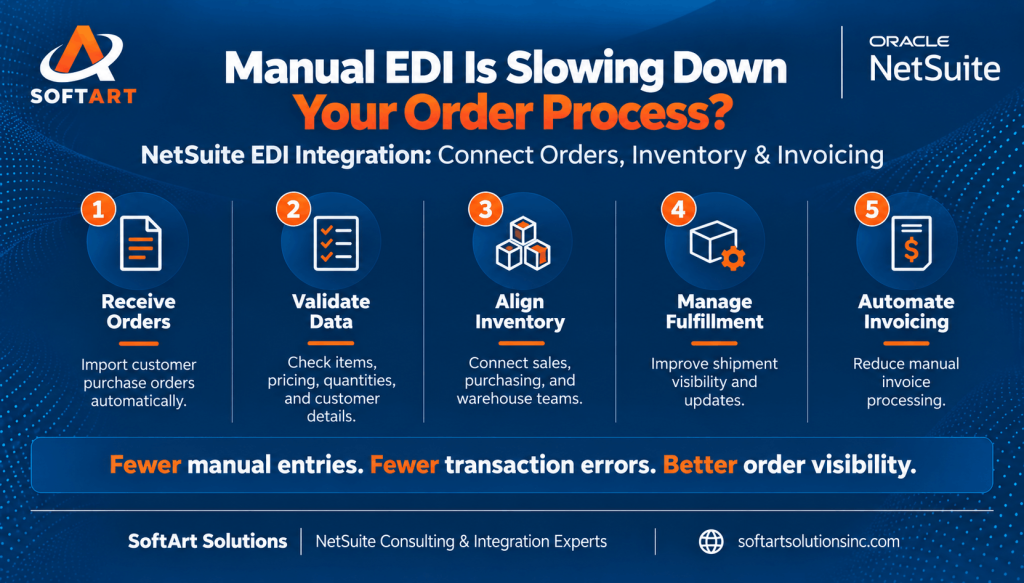
How NetSuite EDI Integration Works
A typical process includes:
- A customer or supplier sends an EDI transaction.
- The EDI platform receives and validates the document.
- The transaction is translated into a format NetSuite can process.
- NetSuite creates or updates the relevant record.
- Required responses, acknowledgements, or documents are sent back to the trading partner.
- Exceptions are reviewed and resolved by the responsible team.
For a more technical explanation, explore SoftArt’s NetSuite EDI integration guide .
Key Design Decisions Before Implementation
Before implementing NetSuite EDI integration, businesses should define:
- Which trading partners need to be connected
- Which EDI documents are required
- Which NetSuite records should be created or updated
- How item, customer, vendor, and location data will be mapped
- How errors and rejected transactions will be handled
- Which compliance and reporting requirements apply
- Whether integration should support future trading partners
A successful implementation depends on business-process alignment, not only technical connectivity.
Common NetSuite EDI Integration Challenges
Businesses may face challenges such as:
- Different requirements across trading partners
- Inconsistent item and customer data
- Complex transaction mapping
- Duplicate or rejected transactions
- Limited error visibility
- Difficult exception handling
- Changes in customer EDI specifications
These issues should be addressed during solution design and testing.
How SoftArt Solutions Can Help
SoftArt Solutions helps businesses evaluate and improve their NetSuite integration processes based on operational requirements.
Our approach can include:
- EDI and trading-partner requirement analysis
- NetSuite integration planning
- Transaction and data mapping
- Workflow alignment
- Error-handling design
- Testing and deployment support
- Ongoing integration improvements
Explore our NetSuite integration services and Oracle NetSuite consulting solutions .
Planning NetSuite EDI Integration?
NetSuite EDI integration should be designed around your order volumes, trading partners, transaction types, and internal workflows.
Whether you are a manufacturer managing supplier and customer transactions or a distributor processing high-volume orders, the right integration approach can help improve accuracy, visibility, and operational efficiency.
Let’s discuss your NetSuite EDI requirements. Contact SoftArt Solutions to discuss your business processes and integration goals..
Frequently Asked Questions
Is NetSuite EDI integration only for large companies?
No. It can support businesses of different sizes. The required solution depends on transaction volume, trading partners, industry requirements, and process complexity.
Can NetSuite EDI integration support multiple trading partners?
Yes. The solution can be designed to support different trading partners, document types, and transaction requirements.
What should be integrated first?
Businesses should usually begin with high-volume or business-critical transactions, such as purchase orders, order acknowledgements, advance shipping notices, and invoices.
How long does implementation take?
Implementation timelines depend on the number of trading partners, transaction types, mapping complexity, testing requirements, and NetSuite configuration.
Can it support manufacturing and distribution workflows?
Yes. NetSuite EDI integration can support order processing, purchasing, inventory, shipment, and invoicing workflows used by manufacturers and distributors.
What happens when an EDI transaction fails?
A reliable solution should provide error visibility, transaction logs, alerts, and a defined process for reviewing and correcting failed transactions.