The Holiday Peak brings more customers, more orders and greater pressure on retail operations. For businesses selling through physical stores, online storefronts and marketplaces, managing inventory across multiple channels can quickly become complicated. Products sell in-store but remain available online, warehouse teams struggle with fulfilment, and customer service teams lack accurate delivery updates.
These challenges often arise when sales, inventory and fulfilment operate on disconnected systems. Odoo for Retail & eCommerce connects Point of Sale (POS), eCommerce, inventory, sales and accounting through an integrated ERP platform. Retailers can use it to improve stock visibility, coordinate orders and prepare their operations for seasonal demand and growth into 2027.
Why Retailers Struggle to Manage Inventory and Orders During the Holiday Peak
Consider a retailer selling the same product through its website and two physical stores. A holiday promotion increases demand, and several customers purchase the product within minutes. If inventory information is not updated correctly across sales channels, the business risks accepting orders for stock it cannot fulfil.
Common challenges include:
- Stockouts and overselling: Product availability becomes difficult to manage across channels.
- Order fulfilment delays: Warehouse teams struggle with increased picking, packing and shipping volumes.
- Disconnected sales data: Store and online teams work with different records.
- Returns and exchanges: Refunds and returned stock become harder to track.
- Customer dissatisfaction: Delayed deliveries and incorrect availability information affect the buying experience.
Managing these operations through connected systems becomes particularly important during high-volume sales periods.
How Odoo Connects Retail Stores, eCommerce and Inventory
Odoo brings retail operations together through applications such as POS, eCommerce, Inventory, Sales and Accounting.
When configured correctly, these applications share relevant business information, reducing the need for separate records for online and offline transactions. For example, an online order can flow into Odoo’s sales and inventory workflows, while a physical store transaction can update corresponding stock records. Warehouse teams can then process delivery orders using connected inventory information.
This gives retail teams better visibility into product availability, customer orders and stock movements.
Manage In-Store Sales with Odoo POS During Peak Shopping Hours
Long checkout queues and payment delays can affect the customer experience during the Holiday Peak. Retailers need a POS system that supports efficient transactions while keeping sales and inventory information connected.
Odoo Point of Sale offers capabilities including:
- Barcode scanning: Identify products and process transactions efficiently.
- Offline operations: Continue supported POS transactions without an active internet connection, with synchronisation when connectivity returns.
- Retail hardware: Connect supported barcode scanners, receipt printers and payment terminals.
- Customer loyalty: Manage loyalty programmes, gift cards and promotional offers.
- Sales visibility: Track store transactions and related inventory movements.
For retailers operating multiple outlets, connected POS and inventory workflows can improve visibility into store-level sales and stock.
Manage Online Sales and Orders with Odoo eCommerce
Holiday promotions often increase website traffic and online order volumes. Retailers need to manage the shopping experience while ensuring incoming orders reach the right fulfilment teams.
Odoo eCommerce provides website and storefront management alongside connected business applications. Retailers can use features such as:
- Website building and product catalogue management.
- Product variants and options.
- Upselling and cross-selling.
- Abandoned cart recovery.
- Payment and shipping integrations.
Businesses also selling through Shopify, WooCommerce or Amazon may require additional connectors or API-based integrations to synchronise products, orders and inventory. Capabilities depend on the integration solution and its configuration.
Keep Inventory Accurate Across Stores, Warehouses and Online Channels
Inventory accuracy becomes critical when multiple sales channels compete for available stock.Odoo Inventory helps retailers manage stock across warehouses and locations, track product movements and configure replenishment rules.
Key capabilities include:
- Multi-location inventory: Monitor stock across warehouses and retail outlets.
- Reordering rules: Set replenishment triggers based on business requirements.
- Barcode operations: Support product identification and warehouse movements.
- Stock movement tracking: Monitor incoming, outgoing and internal transfers.
- Connected sales workflows: Coordinate inventory operations with Odoo POS and eCommerce.
For example, imagine a retailer has 50 units of a product across two stores and a central warehouse. An online promotion increases demand unexpectedly. With properly configured inventory workflows, the team can review available stock, identify where products are located and organise transfers or replenishment.
One important consideration is how inventory availability is calculated across sales channels. Different warehouses, stores and external marketplaces may follow different stock rules. These workflows need to be configured and tested before high-volume sales begin.
What Happens When a Customer Places an Online Order During the Holiday Peak?
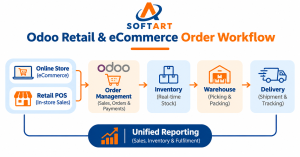
Understanding how an order moves through the ERP helps retailers see the practical value of connecting applications. With the relevant Odoo applications configured, an online purchase can follow this workflow:
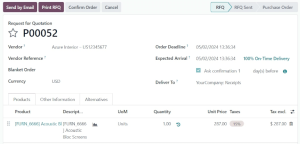
- Customer places an order: The purchase is recorded through Odoo eCommerce.
- Sales order is created: Order details become available to the sales and fulfilment teams.
- Inventory is checked: The system processes relevant stock reservation and delivery operations.
- Warehouse processes the order: Staff pick and pack the product.
- Order is shipped: Delivery information and order status are updated through the connected workflow.
- Financial records are updated: Invoicing and payment information can be managed through Odoo Accounting.
This connected process reduces manual handoffs and gives teams better visibility into order progress. The exact workflow depends on payment, delivery and inventory configuration.
Connect Order Fulfilment, Accounting and Customer Management
Processing an order is only the beginning. Retailers must also prepare shipments, collect payments, manage invoices and handle customer queries. Odoo connects these activities through its wider ERP applications:
- Sales: Manage customer orders and transactions.
- Inventory: Track stock availability and warehouse movements.
- Warehouse: Coordinate picking, packing and delivery.
- Accounting: Manage invoices, payments and financial records.
- CRM: Maintain customer information and sales opportunities.
- Marketing: Support promotional campaigns and customer engagement.
Connected operational and financial records can reduce duplicate data entry and improve visibility into business performance.
Preparing Your Retail Business for 2027: Holiday Peak Readiness Checklist
Retailers planning for 2027 should review their operations before order volumes increase.
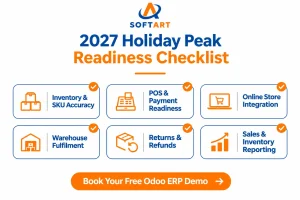
- Inventory accuracy: Are product SKUs, variants and stock quantities accurate?
- Omnichannel readiness: Are physical stores and online channels sharing correct inventory information?
- Integration reliability: Have external eCommerce and marketplace connections been tested?
- POS readiness: Have payment methods, barcode scanners and offline workflows been tested?
- Warehouse efficiency: Are picking, packing and shipping workflows configured?
- Returns management: Have refund, exchange and returned-stock processes been tested?
- Reporting: Can managers review sales, inventory and fulfilment performance?
Preparing these processes ahead of seasonal demand helps retailers identify operational gaps before they affect customers.
Odoo Pricing Plans USA: What Should Retailers Consider Before Implementation?
When evaluating Odoo pricing plans in the USA, retailers should consider the subscription, number of users, hosting requirements and applications they need. Odoo offers a One App Free plan, as well as Standard and Custom paid plans. The Custom plan includes additional options such as external API access, multi-company functionality and customisation capabilities.

The Odoo license cost in the USA is only one part of the overall investment. Data migration, POS configuration, eCommerce integrations, custom workflows, training and implementation services may involve additional costs.
Read SoftArt’s Odoo Pricing Plans and Licensing Guide to understand the available options. Choosing an experienced Odoo implementation partner also matters. Retail workflows need to be documented, configured and tested against actual business scenarios before going live.
Prepare Your Retail Business for the Next Holiday Peak with SoftArt Solutions
Managing retail growth requires accurate inventory, connected sales channels and reliable fulfilment workflows. Odoo provides an integrated platform to bring these operations together. SoftArt Solutions helps businesses evaluate, implement, integrate and customise Odoo around their operational requirements.
Planning your next retail ERP project? Speak with SoftArt Solutions and book an Odoo ERP demo to explore the right approach for your business.
Frequently Asked Questions
1. Can Odoo manage online and in-store inventory together?
Yes. Odoo POS, eCommerce and Inventory can work together to provide connected sales and stock information across retail operations.
2. Does Odoo POS work offline?
Yes. Odoo POS supports offline operations for supported workflows, with synchronisation when connectivity returns.
3. Can Odoo integrate with Shopify and WooCommerce?
Yes. Integration solutions can connect Odoo with external eCommerce platforms. Functionality depends on the connector and configuration.
4. How much does Odoo cost in the USA?
Odoo offers different subscription plans based on business requirements. Licensing, implementation, integrations and customisation should be evaluated separately.
5. Can I book an Odoo ERP demo?
Yes. You can request an Odoo ERP demo from SoftArt Solutions to explore how Odoo can support your retail, inventory and eCommerce requirements.