You’re building a business case for Business Central, or reviewing one that landed on your desk. The cost looks significant. The ROI claims look compelling but carry Microsoft’s name on them. You need an honest breakdown before approving the spend.
Here’s the direct answer: Microsoft Dynamics 365 Business Central delivers measurable ROI for most USA SMBs when the implementation is scoped correctly, the license tier matches actual user needs, and integration with existing systems is planned before go-live. When those conditions aren’t met, cost overruns reduce or eliminate the return.
SoftArt Solutions Inc. delivers Dynamics 365 Business Central consulting service USA covering implementation, licensing advisory, integration, and post go-live support.
Read on for a full cost breakdown, verified ROI data with honest caveats, and a direct answer to whether the investment makes sense for your business.
What Does Microsoft Dynamics 365 Business Central Actually Cost in 2026?
Dynamics 365 Business Central costs break into two layers. The license is per user per month, published by Microsoft, and predictable. The implementation depends on scope, users, integrations, and customisation depth.
What Is the Dynamics 365 License Cost Per User?
Microsoft updated Business Central pricing effective November 1, 2025, the first increase in over five years. Current USA list pricing:
| License Type | Monthly Cost (Per User, Annual Billing) |
| Essentials | $80 |
| Premium | $110 |
| Team Member | $8 |
| Device | $45 per device |
Essentials covers finance, sales, purchasing, inventory, and project management. Premium adds manufacturing and service management on top of everything in Essentials. If your business manufactures products or manages equipment servicing, Premium is the right licence. If it doesn’t, Essentials covers the full operational scope at a lower dynamics 365 license cost.
Team Member licences at $8 per user cover read access, basic approvals, and time entry. For businesses with large numbers of light users, a mixed licence strategy combining Team Members with Essentials or Premium can reduce total licensing spend by 30 to 40%, according to TopDynamicsPartners’ July 2026 pricing analysis.
What Does Dynamics 365 Business Central Implementation Cost in the USA?
Dynamics 365 Business Central implementation cost in the USA depends on the scope, not a fixed number. Based on verified 2026 partner data:
- Core financials implementation: From $25,000 for small businesses with basic requirements (Source: Rand Group, April 2026)
- Mid-market full deployment: $40,000 to $100,000 for businesses with 20 to 100 users, multiple modules, and standard integrations (Source: Cargas, March 2026)
- Complex or multi-entity deployment: $120,000 to $180,000 and above for manufacturing, multi-location, or heavily customised rollouts (Source: TopDynamicsPartners, July 2026)
Implementation cost covers:
- System configuration and module setup
- Data migration from legacy systems
- Dynamics 365 integration services connecting Business Central to existing tools
- User training
- Go-live support and post go-live stabilisation
What Hidden Costs Can Reduce Business Central ROI?
The costs most businesses underestimate are integration build time, Power BI reporting configuration, user training, customisation maintenance after annual updates, and post go-live support outside the implementation contract.
Five categories to budget for explicitly:
- Over-Licensing. Assigning Premium licences to users who only need Essentials is the most common avoidable cost. It adds $30 per user per month with no operational benefit for those users. On a 50-user deployment, that’s $18,000 per year in unnecessary spend.
- Dynamics 365 Integration Services. Connecting Business Central to Shopify, Salesforce, ADP, or a legacy system requires scoped development work. Each integration has a build cost, a test cost, and an ongoing maintenance cost after each annual Business Central release.
- Power BI Reporting. Standard financial reporting is included. Executive dashboards, operational KPIs, and custom reporting require separate design and configuration effort. This adds cost but also adds ROI when done correctly.
- User Training. Training on the specific configured system, not generic Business Central software, is what drives adoption. Businesses that treat training as an afterthought consistently underperform on post go-live efficiency gains.
- Post Go-Live Support. Most implementation contracts cover a defined warranty period. Ongoing configuration changes, workflow adjustments, and version compatibility work after that period require a separate support engagement.
Keeping customisation minimal is the single most effective way to protect ROI. Custom code increases build time, increases testing time, and requires updates with every major Business Central release. A targeted approach, using standard configuration for 90% of requirements and customising only where genuinely necessary, reduces spend and accelerates payback.
What ROI Can USA Businesses Actually Expect From Business Central?
According to a March 2026 Forrester Total Economic Impact study commissioned by Microsoft, organisations implementing Business Central achieved a projected 209% ROI over three years, a net present value of $464,000, and a payback period of under six months. This study was commissioned by Microsoft. Results reflect organisations with structured implementations and adequate training investment, not universal outcomes.
Most organisations see positive ROI within 12 to 18 months, according to AlphaBOLD’s July 2026 implementation analysis.
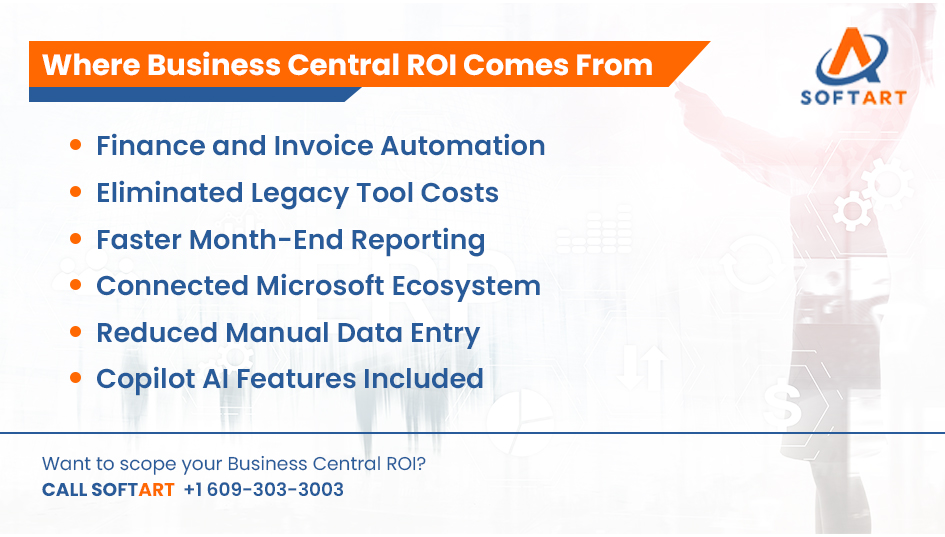
Where the returns actually come from:
- Finance Automation. Invoice processing, bank reconciliation, and payment scheduling handled automatically. Time previously spent on manual finance tasks redirected to analysis and decision-making.
- Eliminated Legacy System Costs. Businesses replacing standalone accounting, inventory, and CRM tools consolidate multiple subscription fees into one platform.
- Improved Reporting Speed. Month-end close that previously took two weeks narrows significantly when data is live across departments. Leadership gets accurate numbers faster.
- Reduced Manual Data Entry. A confirmed sales order updates inventory, triggers purchasing, and generates an invoice without anyone re-entering data across systems.
- Microsoft Ecosystem Integration. Business Central connects natively to Microsoft 365, Teams, Outlook, Excel, and Power BI. For businesses already in the Microsoft ecosystem, this removes integration build cost and accelerates adoption.
- Copilot AI Features. Post-November 2025 licensing includes Sales Order Agent, Payables Agent, bank reconciliation AI, cash flow forecasting, and late payment prediction as standard features.
Businesses that approach implementation with strategic licence tiering and minimal customisation achieve 20 to 40% process efficiency gains, according to TopDynamicsPartners’ July 2026 analysis.
What Conditions Determine Whether the ROI Is Actually Achieved?
Business Central ROI is achieved when the licence tier matches actual user needs, integration is planned before implementation starts, customisation is minimal, and user training is treated as a core project deliverable. When any of those conditions are missed, the return shrinks.
Here’s what each condition means in practice:
- Correct Licence Tiering. Businesses that assign licences based on actual workflow requirements, not worst-case scenarios, reduce year-one cost and improve ROI from day one.
- Integration Planned Before Go-Live. Dynamics 365 integration services scoped and built as part of the implementation, not after, prevent the data gaps that undermine reporting and operational visibility post-launch.
- Minimal Customisation. Every custom development adds build cost, extends the timeline, and creates a maintenance obligation with each annual release. Businesses that configure Business Central to match standard workflows rather than bending the system to legacy processes achieve faster go-live and faster payback.
- Role-Based User Training. Training on the specific configured workflows, not generic platform tours, drives adoption. Poor adoption is the primary reason Business Central implementations deliver less than projected ROI. If users work around the system rather than inside it, the efficiency gains don’t materialise.
This is where Dynamics 365 Business Central consulting service USA becomes the critical variable. The partner who scopes the project, advises on licence selection, builds the integrations, and delivers role-specific training determines whether these four conditions are met or missed.
Is Microsoft Dynamics 365 Business Central Worth the Investment?
For most USA SMBs, yes. Business Central delivers returns when it’s implemented correctly.
Business Central Is Worth The Investment When:
- Your business has 10 to 250 users in manufacturing, distribution, ecommerce, retail, or professional services
- You’re replacing standalone accounting, inventory, or CRM tools with disconnected integrations
- Your team already uses Microsoft 365, Teams, or Excel and will benefit from native connectivity
- You need finance automation, operational reporting, and integrated purchasing without SAP or Oracle pricing
- You want AI features including Copilot included in the base licence rather than as add-ons
Evaluate Further Before Committing When:
- Your finance environment requires complex multi-entity consolidation across many legal entities with different currencies from day one
- Your business has deep dependencies on non-Microsoft platforms where Oracle NetSuite or another ERP integrates more naturally
- Your operational workflows are highly customised and will require significant Business Central development to match them
Neither scenario is a universal verdict. The honest answer depends on your specific requirements, your user base, and whether the implementation is led by an experienced Dynamics 365 Business Central consulting partner.
How Does SoftArt’s Dynamics 365 Business Central Consulting Service Help USA Businesses Protect Their ROI?
SoftArt Solutions Inc. delivers Dynamics 365 Business Central consulting service USA covering the full investment lifecycle, from licence selection through implementation, integration, and post go-live optimisation.
Implementation And Advisory:
- Licence tier assessment and optimisation
- Business requirements documentation
- Module selection and scoping
- System configuration and workflow setup
- Data migration with test run and validation
- User acceptance testing
- Go-live support
Post Go-Live And Integration:
- Dynamics 365 integration services for third-party connections
- Post go-live stabilisation and support
- Power BI reporting configuration
- Copilot AI enablement and workflow automation
- Ongoing managed support
SoftArt has delivered 100+ ERP implementations across Microsoft Dynamics 365, Oracle NetSuite, Oracle Cloud ERP, and Oracle E-Business Suite with 20+ years of ERP delivery experience. That cross-platform experience means the investment recommendation is based on your actual requirements. If Business Central is the right fit, SoftArt implements it to deliver the returns the platform is capable of. If another platform suits your requirements better, that’s what the assessment will show.
Book a Business Central Consultation With SoftArt
If you’re building a Business Central business case, evaluating licence options, or need a scoped implementation estimate before committing budget, SoftArt’s consulting team can help.
Book a Dynamics 365 Business Central consultation with SoftArt.
Email: info@softart.co US: +1 609-303-3003 Canada: +1 609-303-3003 UAE: +971 521490790
Frequently Asked Questions
How Long Does Dynamics 365 Business Central Implementation Take for a USA SMB?
Small businesses with core financials and 10 to 20 users typically go live in 6 to 10 weeks. Mid-market deployments with integrations and multiple modules take 3 to 5 months. Manufacturing or multi-entity rollouts take 6 to 12 months.
Does Business Central Include Copilot AI Features in the Base Licence?
Yes. Post-November 2025 pricing includes Sales Order Agent, Payables Agent, bank reconciliation AI, cash flow forecasting, and late payment prediction as standard features. Additional Copilot credits are available via Azure pay-as-you-go for extended AI use.
What Is the Difference Between Essentials and Premium Licensing?
Essentials covers finance, sales, purchasing, inventory, and project management at $80 per user per month. Premium adds manufacturing and service management at $110 per user per month. Businesses without manufacturing or service management requirements don’t need Premium.
Can SoftArt Help if Our Business Central Implementation Has Gone Over Budget?
Yes. SoftArt’s ERP rescue and recovery service covers stalled or over-budget Business Central implementations. The engagement begins with a project audit to identify scope, cost, and timeline issues, followed by a structured recovery plan.