ERP migration is rarely triggered by one bad day. More often, the need becomes clear through a pattern: reporting takes too long, teams work in spreadsheets, integrations break, users avoid the system, and leaders cannot get a consistent view of the business.
Odoo can be a practical option for businesses that want a connected platform across finance, CRM, sales, inventory, purchasing, manufacturing, projects, ecommerce, and other functions.
However, migration should not be treated as a simple software switch. It should be treated as an opportunity to simplify processes, improve data quality, and establish a more scalable operating model.
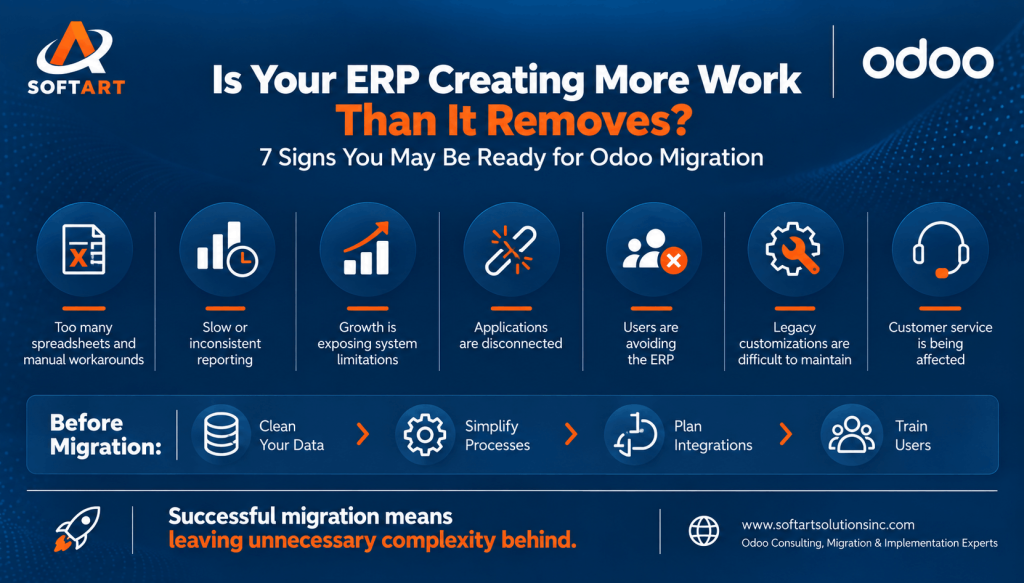
The 7 Signs Your Business May Be Ready
1. Your Current ERP No Longer Fits the Way You Operate
If employees rely on spreadsheets, email approvals, or manual workarounds to complete everyday tasks, the system may no longer reflect the business.
A migration assessment should identify which processes are failing, why they are failing, and whether the issue is related to configuration, adoption, integration, or the ERP platform itself.
2. Reporting Is Slow or Inconsistent
When finance, sales, and operations produce different versions of the same number, decision-making slows down.
Odoo migration creates an opportunity to define common data structures, reporting rules, ownership, and approval processes before moving information into the new ERP.
3. Your Business Is Adding Products, Locations, or Teams
Growth often exposes limitations in older systems. If every new location, product line, or process requires a separate workaround, it may be time to evaluate a more flexible ERP foundation.
The goal should be to support growth without increasing manual administration at the same rate.
4. Your Applications Are Disconnected
A CRM, ecommerce platform, accounting tool, warehouse system, and spreadsheets may each work individually but create friction together.
Odoo integration services can help connect the processes that matter most, provided the integration scope, data ownership, and error-handling requirements are clearly defined.
5. Users Are Avoiding the ERP
Low adoption is often caused by process design, usability, training, or configuration issues.
Migration should address why users work outside the system—not simply move the same complexity into a new platform.
User involvement during discovery, testing, and training is essential for long-term adoption.
6. Customizations Have Become Difficult to Maintain
Older ERP environments can accumulate modifications that make upgrades risky and expensive.
Odoo customization services should be guided by business value, maintainability, and a clear preference for standard functionality where possible.
Before recreating a legacy customization, assess whether the requirement can be addressed through standard Odoo features or a process improvement.
7. Your Current System Is Limiting Customer Experience
Slow quotations, delayed order updates, poor CRM visibility, and inconsistent service can indicate that the underlying systems are disconnected.
A modern ERP should make customer-facing processes easier to manage by connecting customer information, sales activity, inventory, fulfillment, and finance.
What Should You Evaluate Before Migrating?
| Evaluation Area | Questions to Answer |
|---|---|
| Business case | What measurable problem will migration solve? |
| Scope | Which apps, departments, locations, and processes are included? |
| Data | What data must be migrated, cleaned, archived, or excluded? |
| Integrations | Which systems must connect to Odoo on day one? |
| Customization | What is truly required versus what can use standard Odoo features? |
| Users | Who owns each process, and what training will be needed? |
| Timeline | Are there seasonal, financial, or operational constraints? |
| Support | Who will manage issues, improvements, and future releases? |
Odoo Data Migration: What Moves—and What May Not
Not every historical record needs to be moved into the new ERP. A thoughtful Odoo data migration plan should separate information into categories:
- Master data: Customers, vendors, products, price lists, chart of accounts, tax rules, and locations.
- Open transactions: Unpaid invoices, open sales orders, purchase orders, and active projects.
- Historical data: Records needed for compliance, reporting, customer service, or audit.
- Reference data: Attachments, notes, documents, and legacy codes that users still need.
- Archived data: Information that should be retained securely but does not need to live in the operational ERP.
Data should be cleansed, mapped, validated, and reconciled before go-live.
A Practical Odoo Migration Roadmap
- Assess the current ERP, processes, integrations, customizations, and data quality.
- Define the target Odoo scope and future-state workflows.
- Create a data migration strategy covering cleansing, mapping, validation, and reconciliation.
- Design integrations and decide which should be delivered in phase one.
- Configure Odoo and develop only the customizations with a clear business purpose.
- Test end-to-end scenarios with real business users.
- Train teams and prepare cutover communications.
- Go live with a controlled cutover and a defined support plan.
Common Migration Mistakes to Avoid
- Moving poor-quality data without cleansing it.
- Replicating every legacy customization without challenging its purpose.
- Underestimating integrations and reporting requirements.
- Testing individual screens instead of complete business workflows.
- Leaving user training until the final week.
- Going live without clear ownership for issues and decisions.
- Trying to migrate everything at once without a phased risk plan.
How SoftArt Solutions Can Help
SoftArt Solutions can support businesses evaluating Odoo ERP software in the USA, Odoo implementation services, Odoo migration services, data migration, integrations, and customization.
The focus should be on translating business requirements into a maintainable Odoo environment—not creating unnecessary complexity.
A strong Odoo implementation partner should help you decide what to standardize, what to integrate, what to customize, and what to leave behind. That decision-making is often more important than the technical migration itself.
Planning Your Odoo ERP Migration?
Before selecting an implementation approach, review your current processes, data quality, integrations, customizations, and business priorities.
SoftArt Solutions can help you assess migration readiness and develop a practical roadmap based on your operational requirements.
Contact SoftArt Solutions to discuss your Odoo migration goals.
Frequently Asked Questions
How do I know if my business is ready for Odoo migration?
You may be ready when the current system creates recurring operational friction, limits growth, produces unreliable reporting, or requires too many manual workarounds. A structured assessment can help confirm the business case.
Can historical data be migrated to Odoo?
Yes, but the approach depends on data quality, volume, structure, reporting needs, and compliance requirements. Some history may be migrated while other records are archived.
Should we customize Odoo before go-live?
Only when the requirement is important and cannot be met through standard configuration or a sensible process change. Excessive customization can increase long-term maintenance.
How long does Odoo migration take?
The timeline depends on scope, data, integrations, customization, number of users, and testing requirements. A discovery and planning phase is essential.
Can Odoo integrate with our existing systems?
Odoo can be integrated with other business applications, but each integration needs a clear data owner, process owner, error-handling approach, and testing plan.