UAE businesses need ERP systems that calculate VAT correctly, post it accurately, and produce reliable reporting for finance teams. The challenge is that VAT setup in Business Central is not just a rate entry. It depends on posting groups, tax logic, statements, master data, and testing before go-live.
Here is the direct answer. What is VAT in Dynamics 365 Business Central? It is the tax framework used to calculate, record, and report VAT on sales and purchase transactions. For UAE businesses, the setup must align with local VAT treatment and stay clean enough to support future compliance needs, including the UAE’s expanding digital tax environment.
At SoftArt, we help businesses build VAT-ready Business Central environments with accurate configuration, finance workflow alignment, and ongoing ERP support.
Read on to understand the VAT feature, setup steps, reporting, and common mistakes to avoid.
What Is VAT In Dynamics 365 Business Central?
VAT in Dynamics 365 Business Central is the system logic used to calculate, post, and report value-added tax for business transactions.
The UAE Federal Tax Authority defines VAT as a transaction-based indirect tax levied at each stage of the supply chain, with registered businesses collecting and accounting for the tax. In Business Central, VAT is handled through tax posting structures that determine how VAT applies to sales, purchases, and reporting. Business Central supports VAT through:
- VAT business posting groups
- VAT product posting groups
- VAT posting setup combinations
- VAT entries created after posting
- VAT statements and reporting structures
This is the practical answer to what is VAT in Dynamics 365 Business Central for finance teams planning UAE configuration.
Why Does VAT Setup Matter For UAE Businesses Using Business Central?
VAT setup matters because every invoice, purchase, and tax report depends on correct tax logic inside the ERP.
UAE VAT is currently charged at 5 percent for standard-rated supplies, and registered businesses must file VAT returns and make payments within 28 days from the end of the tax period. Poor ERP tax setup can create mismatched balances, incorrect postings, and reporting rework. A clean VAT setup helps businesses:
- Calculate tax consistently
- Separate output VAT and input VAT
- Reduce manual finance corrections
- Prepare more reliable VAT reports
- Improve audit readiness
For UAE businesses, VAT configuration should be treated as a finance control issue, not only a software setup task.
How Does Business Central Calculate And Track VAT?
Business Central calculates VAT by combining the customer or vendor tax treatment with the item, service, or account tax treatment.
The calculation relies on three connected elements:
| VAT Element | What It Controls |
|---|---|
| VAT Business Posting Group | Tax treatment of customers, vendors, or business parties |
| VAT Product Posting Group | Tax treatment of items, services, or G/L accounts |
| VAT Posting Setup | VAT rate, calculation type, and posting accounts |
Microsoft’s Business Central documentation confirms that VAT reports are calculated from the VAT posting setup and VAT posting groups configured in the system. VAT entries are then used for reporting and statement preparation.
How To Configure VAT In Dynamics 365 Business Central UAE?
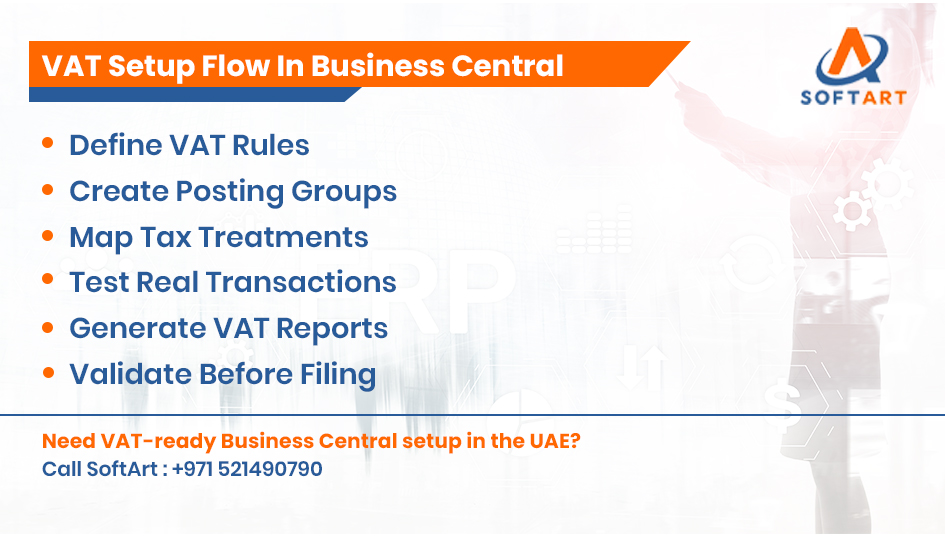
To configure VAT in Dynamics 365 Business Central UAE, businesses need to build the correct posting structure, apply it to master data, and test real transactions before go-live. A practical configuration flow includes:
- Review UAE VAT transaction needs.
- Create VAT business posting groups.
- Create VAT product posting groups.
- Configure VAT posting setup combinations.
- Assign VAT settings to customers, vendors, items, and G/L accounts.
- Define sales VAT and purchase VAT accounts.
- Build the VAT statement structure.
- Test sales and purchase scenarios.
- Reconcile VAT totals before go-live.
Business Central uses posting groups and VAT posting setup to control how VAT is calculated and recorded, while VAT statements support periodic tax reporting.
This is the core process for how to configure VAT in Dynamics 365 Business Central UAE in a controlled and report-ready way.
Which VAT Reports And Statements Matter In Business Central?
VAT statements help businesses review tax amounts before they prepare filings or internal reconciliations.
Microsoft states that the VAT Statement report can be used to review VAT amounts, validate input and output VAT, and prepare documentation for tax authorities. Business Central’s VAT reporting also uses the VAT Date as the primary reporting date for VAT entries. Finance teams usually rely on:
- VAT statement totals
- Input VAT review
- Output VAT review
- Period-based tax reporting
- Reconciliation of posted VAT entries
For UAE businesses, these reports should be tested against real invoice and purchase scenarios before daily use begins.
How Will 2026 And Beyond Affect VAT Readiness In Business Central?
From 2026 onward, UAE finance teams should treat VAT data quality as part of broader digital tax readiness.
The UAE Ministry of Finance released electronic invoicing guidelines in February 2026, confirming a phased e-invoicing rollout and a move toward structured digital invoice exchange. Even though this is a separate mandate from VAT setup itself, it increases the importance of clean invoice data, tax master data, customer details, and consistent ERP transaction structures. For Business Central users, that means VAT readiness should also include:
- Clean customer and vendor master data
- Consistent tax posting logic
- Accurate invoice fields
- Reliable approval workflows
- Reporting structures that can support future digital compliance work
This keeps the blog aligned to VAT, while reflecting the 2026 compliance environment that UAE businesses now face.
What Common VAT Setup Mistakes Should UAE Businesses Avoid?
The most common VAT problems come from incomplete setup, weak data mapping, and insufficient testing. Avoid these mistakes:
- Using the wrong VAT posting group
- Applying the wrong tax rate logic
- Leaving customer or vendor tax fields incomplete
- Missing item or service tax mapping
- Skipping VAT report reconciliation
- Testing only simple transactions before go-live
These issues may not appear immediately, but they often surface during reporting, audits, or month-end close.
How Do Dynamics 365 Business Central Consulting Services UAE Help With VAT Setup?
Dynamics 365 Business Central consulting services UAE help businesses configure tax logic correctly, validate reports, and align VAT setup with real finance workflows. Support usually includes:
- VAT posting group design
- VAT account mapping
- Master data checks
- VAT statement setup
- Transaction testing
- Finance user training
- Post-go-live correction planning
SoftArt positions its UAE Business Central services around VAT compliance, local business requirements, and long-term ERP support.
When Does VAT Setup Need Wider ERP Integration Planning?
VAT setup becomes more complex when finance data flows between Business Central and other systems. This can include:
- Ecommerce platforms
- CRM systems
- Procurement tools
- Banking platforms
- Business intelligence reporting
Where businesses operate across mixed ERP landscapes, SoftArt can also support broader architecture needs through NetSuite integration services and guidance relevant to organisations evaluating NetSuite partners UAE alongside Business Central planning.
What Should Businesses Check Before Going Live With VAT In Business Central?
Before go-live, businesses should confirm that VAT logic works across real UAE finance scenarios. The final checklist should include:
- Posting groups tested
- VAT rates checked
- Customer and vendor masters reviewed
- Item and service tax treatment verified
- VAT statement totals reconciled
- Reporting periods confirmed
- Finance users trained
These checks reduce the risk of posting errors and reporting confusion after go-live.
Get VAT-Ready Business Central Support From SoftArt
VAT setup in Business Central affects invoices, purchases, reporting, and audit confidence. A clean setup helps UAE businesses calculate tax correctly today and stay better prepared for future digital compliance needs.
SoftArt provides Dynamics 365 Business Central consulting services UAE for VAT configuration, reporting alignment, finance workflow setup, and ongoing optimisation. Our team helps businesses move from tax setup confusion to a controlled ERP process that finance teams can rely on.
Contact SoftArt: Email: info@softart.co
Call Us At – UAE: +971 521490790 | US: +1 609-303-3003 | Canada: +1 609-303-3003
Frequently Asked Questions
What Is VAT In Dynamics 365 Business Central?
VAT in Dynamics 365 Business Central is the tax setup used to calculate, post, and report VAT on sales and purchase transactions. It works through posting groups, VAT posting setup, VAT entries, and VAT statements.
How To Configure VAT In Dynamics 365 Business Central UAE?
Businesses configure VAT by creating posting groups, setting VAT posting combinations, assigning VAT logic to masters and accounts, building VAT statements, and testing transaction scenarios. The setup must be reviewed carefully before go-live.
Does Business Central Support VAT Reporting?
Yes. Business Central supports VAT reporting through VAT statements, VAT entries, and report structures that help users review tax totals before filing or reconciliation.
Why Do UAE Businesses Need Accurate VAT Posting Groups?
VAT posting groups determine how Business Central applies tax logic to customers, vendors, items, services, and G/L transactions. If the groups are wrong, VAT calculations and reports can also be wrong.
When Should I Use Dynamics 365 Business Central Consulting Services UAE?
Businesses should involve consultants when VAT setup needs localisation review, report validation, workflow alignment, or go-live testing. Expert support reduces configuration errors and improves reporting confidence.
Why Does VAT Readiness Matter Beyond 2026?
The UAE’s 2026 e-invoicing guidance makes structured tax and invoice data more important. A clean VAT setup today supports better finance discipline as digital compliance requirements expand.