Managing finances becomes more complex as a business grows. What starts with tracking income, expenses, invoices, and payments can eventually involve inventory management, multiple locations, financial reporting, and coordination across departments.
QuickBooks and Oracle NetSuite are two business software solutions that help companies manage their financial operations, but they serve different business needs.
QuickBooks is primarily an accounting solution designed to help businesses manage everyday financial tasks. Oracle NetSuite is a cloud-based Enterprise Resource Planning (ERP) platform that brings financial management together with other business functions, including inventory, order management, CRM, and reporting.
For businesses evaluating their next accounting or ERP solution, understanding what each platform offers is an important first step.
Let’s look at how NetSuite and QuickBooks compare, what each solution offers, and which may be the right fit for your business.
NetSuite vs. QuickBooks: Key Differences
Both platforms help businesses manage their finances, but they differ in their scope, functionality, and ability to support more complex operations.
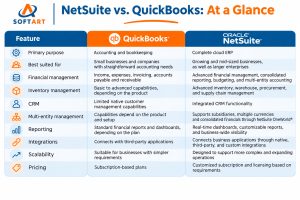
The right choice depends on how your business operates today and what it needs as it grows.
1. When Is QuickBooks the Right Choice?
QuickBooks is a practical option for businesses that need reliable accounting software without the complexity of a full ERP system.
It helps manage everyday financial activities, including:
- Creating invoices and tracking payments
- Recording income and expenses
- Managing accounts payable and receivable
- Reconciling bank transactions
- Tracking basic inventory, depending on the product
- Generating financial statements and tax reports
For a small business with one legal entity, straightforward accounting processes, and limited inventory requirements, QuickBooks may be all it needs.
QuickBooks also offers different products and editions. QuickBooks Online and QuickBooks Enterprise, for example, have different capabilities, so businesses should compare the specific edition against their operational requirements.
QuickBooks may be a good fit if:
- Your primary requirement is bookkeeping and financial management.
- You operate from a relatively simple business structure.
- Your inventory and order management requirements are limited.
- Your existing accounting processes are working well.
- You want to keep software costs and implementation requirements manageable.
However, as business operations become more complex, accounting software alone may not provide the level of visibility and control your teams need.
2. When Should You Consider NetSuite?
Oracle NetSuite is designed for businesses that need more than accounting software.
It combines financial management with operational functions, helping teams work with shared business data rather than relying on separate systems and spreadsheets.
NetSuite can support:
- Financial management and accounting
- Inventory and warehouse management
- Order and procurement management
- Customer relationship management (CRM)
- Supply chain management
- Revenue recognition
- Multi-subsidiary and multi-currency operations
- Business intelligence and reporting
For example, a wholesale distributor managing multiple warehouses may need real-time inventory visibility, accurate order processing, and consolidated financial reporting. Managing these activities across disconnected applications can create delays and reconciliation problems.
NetSuite can bring these processes together in one ERP environment.
NetSuite may be a better fit if:
- Your business operates across multiple entities, subsidiaries, or locations.
- You need consolidated financial reporting.
- Inventory and warehouse operations are becoming more complex.
- Finance, sales, purchasing, and operations rely on disconnected systems.
- Manual data entry and spreadsheet-based reporting are taking too much time.
- You need more detailed reporting and visibility across the business.
Learn more about our Oracle NetSuite services, from licensing and implementation to integration and ongoing support.
3. NetSuite vs. QuickBooks: Pricing and License Cost
Pricing is an important consideration when comparing NetSuite and QuickBooks.
QuickBooks generally has a lower starting cost and subscription-based pricing. The total cost depends on the product, subscription plan, number of users, and additional services or applications required.
NetSuite uses a customized licensing and subscription model. The total investment depends on factors such as:
- Selected NetSuite edition and modules
- Number and type of user licenses
- Number of subsidiaries and business entities
- Required integrations and customizations
- Implementation scope
- Training and ongoing support
When evaluating Oracle NetSuite pricing, it is important to look beyond the initial license cost.
For example, a business may need inventory management, advanced financial reporting, or multi-entity functionality. These requirements can affect the modules and services included in its NetSuite subscription.
It is also worth considering the cost of maintaining separate systems, manual work, and additional integrations when comparing the total cost of ownership.
To plan your budget, see our breakdown of NetSuite license costs in the USA and our guide to NetSuite implementation cost.
4. Integrations: Connecting Your Business Systems
As businesses grow, they often use multiple applications to manage sales, customer relationships, inventory, payments, and operations.
The challenge is making sure these systems share accurate information.
QuickBooks connects with a range of third-party applications. However, businesses with more complex requirements may need additional applications or integration tools to connect their workflows.
NetSuite offers a broader ERP environment, with integration options for applications such as Salesforce, HubSpot, e-commerce platforms, logistics systems, and other business applications.
For example, connecting an e-commerce platform with NetSuite can help synchronize orders, customer information, and inventory data. This reduces the need for teams to manually update information across multiple systems.
The right integration approach depends on the applications involved, the direction of data flow, and the business processes that need to be connected.
Need help connecting NetSuite with other platforms? As a US-based NetSuite integration partner, SoftArt offers NetSuite integration services in the USA for CRM, eCommerce, EDI and payment systems.
5. Moving from QuickBooks to NetSuite
Many businesses start with QuickBooks and consider NetSuite when their accounting and operational requirements become more complex.
However, moving from one system to another requires more than transferring financial records.
A successful migration needs proper planning around:
1. Review existing data
Identify the financial records, customer information, vendor details, inventory data, and historical transactions that need to move into NetSuite.
2. Clean and prepare the data
Review duplicate records, incomplete information, inconsistent account codes, and outdated data before migration.
3. Map business processes
Understand how your current accounting, purchasing, sales, inventory, and reporting processes will work in NetSuite.
4. Configure NetSuite
Set up the required modules, user roles, approval workflows, financial structures, and reporting.
5. Test integrations and migrated data
Validate financial balances, inventory quantities, transaction records, and connected applications before going live.
6. Train users and plan the transition
Make sure employees understand the new workflows and know how to use the system effectively.
The migration process should be planned around your business requirements. Moving unnecessary data or recreating inefficient processes in a new ERP can create avoidable problems.
Working with an experienced NetSuite solution provider can help you assess your requirements, plan the implementation, and manage the transition.
6. How SoftArt Solutions Helps Businesses with NetSuite
Choosing an ERP system is only one part of the process. The way it is evaluated, implemented, integrated, and supported also matters.
SoftArt Solutions Inc. works with businesses to evaluate, implement, integrate, and support enterprise ERP systems, including Oracle NetSuite.
Based in Princeton, New Jersey, SoftArt supports mid-market and enterprise businesses across industries such as manufacturing, wholesale distribution, retail, healthcare, and financial services.
Its NetSuite services include:
- ERP consulting: Evaluating business requirements and identifying the right NetSuite setup.
- Licensing: Helping businesses understand licensing options and requirements.
- Implementation: Planning, configuring, and deploying NetSuite around business processes.
- Integration: Connecting NetSuite with CRM, e-commerce, logistics, and other business applications.
- Support and customization: Helping businesses maintain and improve their NetSuite environment.
Choosing someone to support NetSuite after go-live? Our guide explains what to look for in a NetSuite support services provider in the USA.
For a real example, see our NetSuite wholesale distribution case study, showing how SoftArt connected inventory, procurement, eCommerce and financial operations for a distributor.
Final Thoughts: NetSuite or QuickBooks?
The choice between NetSuite and QuickBooks comes down to the complexity of your business operations.
If you need accounting software to manage invoices, expenses, and financial records, QuickBooks may be the right choice.
If your business needs connected financial and operational management, more advanced inventory capabilities, multi-entity reporting, and room to scale, NetSuite is worth considering.
Before making a decision, evaluate your current processes, future requirements, integration needs, and total cost of ownership.
Not sure whether NetSuite is the right fit for your business?
Book a free NetSuite consultation with SoftArt to review your ERP requirements, compare NetSuite licensing options, and see what a NetSuite implementation could look like for your organization.
Frequently Asked Questions
1. What is the main difference between NetSuite and QuickBooks?
QuickBooks is primarily accounting software for managing everyday financial activities. NetSuite is a cloud ERP platform that combines financial management with functions such as inventory, order management, CRM, procurement, and reporting.
2. Is NetSuite better than QuickBooks?
Neither platform is automatically better for every business. QuickBooks is suitable for businesses with straightforward accounting needs. NetSuite may be a better fit for companies managing multiple entities, complex inventory, connected business operations, and more advanced reporting requirements.
3. Is NetSuite more expensive than QuickBooks?
NetSuite typically requires a larger investment because it offers a broader range of ERP capabilities and often involves implementation and configuration. QuickBooks generally has a lower starting subscription cost. The actual cost of either solution depends on the product, plan, users, and business requirements.
4. Can a small business use NetSuite?
Yes. A small business can use NetSuite, but it should evaluate whether the platform’s capabilities and total cost make sense for its current operations and future plans. For businesses with straightforward accounting requirements, QuickBooks may be sufficient.
5. Can you migrate from QuickBooks to NetSuite?
Yes. Businesses can migrate relevant financial, customer, vendor, inventory, and historical transaction data from QuickBooks to NetSuite. The process requires data preparation, account mapping, configuration, testing, and user training.
6. Does NetSuite replace QuickBooks?
NetSuite can replace QuickBooks as the primary financial management system while also supporting broader ERP functions. Whether a business should make the switch depends on its operational needs, reporting requirements, and growth plans.
7. How do I choose a NetSuite implementation partner in the USA?
Look for a partner with relevant NetSuite implementation experience, industry knowledge, integration capabilities, and ongoing support services. It is also important to understand the proposed implementation scope, timeline, responsibilities, and costs before making a decision.